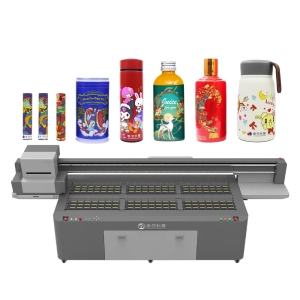
During long-term operation, a UV printer requires regular printhead cleaning to keep nozzles clear and maintain stable printing quality. During the cleaning process, the waste ink pad plays an important role in collecting waste ink, absorbing cleaning liquid, and protecting the printhead. As printing hours increase, the waste ink pad gradually accumulates large amounts of UV ink residue, which may lead to reduced absorption performance, surface hardening, and contamination around the printhead area. Although the waste ink pad is a small component inside a UV printer, it has a direct impact on printhead cleaning efficiency. If the waste ink pad is not properly maintained, incomplete cleaning may occur, resulting in problems such as missing ink, nozzle blockage, unstable colors, and poor printing results.
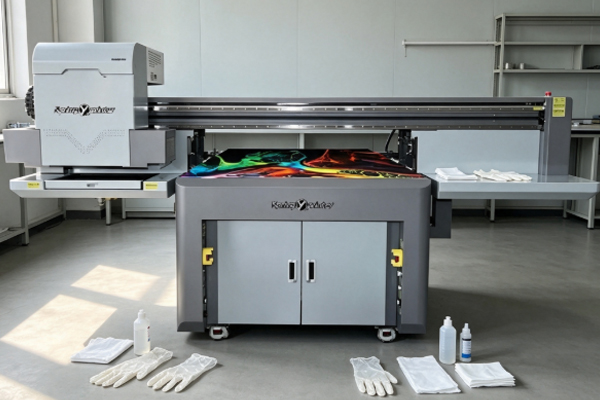
With the continuous development of UV printing technology, modern printers require more precise maintenance procedures to ensure stable operation. At the same time, the application of LED UV ink technology has improved curing performance and printing efficiency, but it also requires operators to pay more attention to waste ink management and equipment maintenance. Therefore, understanding how to replace and maintain a UV printer waste ink pad is an important part of professional UV printer maintenance.
Preparation Before Replacing a UV Printer Waste Ink Pad
Determine Whether the Waste Ink Pad Needs Replacement
During daily UV printer operation, operators should regularly check the working condition of the waste ink pad. If printhead cleaning performance becomes noticeably worse, or if the surface of the waste ink pad remains wet and contains a large amount of hardened ink residue, the pad may be close to the end of its service life. Under normal conditions, the waste ink pad absorbs waste ink generated during printhead cleaning and keeps the bottom area of the printhead clean. However, after long-term use, the internal structure of the pad becomes saturated with UV ink, reducing its absorption ability. When this happens, timely replacement is necessary.
Before replacement, operators can check the following conditions:
- Whether the surface of the waste ink pad has hardened ink blocks;
- Whether waste ink can be absorbed normally during printhead cleaning;
- Whether ink residue remains around the printhead parking position.
Regular inspection is an essential part of UV printer maintenance and helps prevent unexpected printing failures.
Prepare a Suitable New Waste Ink Pad and Tools
Before replacing the waste ink pad, the correct replacement part should be prepared according to the printer model. Different UV printer brands and models may use different waste ink pad sizes, installation structures, and material designs. Using an unsuitable pad may affect sealing performance and waste ink absorption efficiency. Operators should also prepare necessary tools, including disposable gloves, lint-free cloths, and cleaning solutions. These tools help prevent contamination around the printhead area during replacement. Proper preparation can reduce equipment downtime and make the replacement process safer and more efficient.
UV Printer Waste Ink Pad Replacement Procedure
Turn Off the Printer and Move the Printhead to a Safe Position
Before replacing the waste ink pad, the UV printer power supply should be turned off to stop operation completely. The printhead should then be moved to a suitable maintenance position to prevent accidental contact or damage during replacement. Some industrial UV printers have automatic maintenance positions that allow the printhead to move through the control system. If this function is unavailable, operators should follow the equipment manual carefully and avoid forcing the printhead movement, as this may damage the guide rail system or printhead components. Proper shutdown procedures are an important safety step in professional UV printer maintenance.
Remove the Old Waste Ink Pad and Install the New Component
When removing the old waste ink pad, operators should first observe the original installation method. Some UV printers use clip-based fixing structures, while others install the waste ink pad as part of a complete waste ink assembly. During removal, care should be taken to prevent residual UV ink from dripping into the internal components of the machine. After removing the old pad, the surrounding area should be cleaned before installing the new one.
Replacement steps usually include:
- Remove the used waste ink pad;
- Clean remaining ink residue around the waste ink area;
- Install the new waste ink pad;
- Check whether the pad is securely fixed.
After installation, confirm that the contact position between the waste ink pad and the printhead is accurate. Incorrect positioning may prevent proper waste ink absorption during cleaning cycles.
Daily Maintenance Methods for UV Printer Waste Ink Pads
Regularly Clean Ink Residue on the Waste Ink Pad Surface
During operation, the waste ink pad continuously absorbs UV ink produced during printhead cleaning. If it is not cleaned regularly, a thick layer of ink residue may gradually build up on the surface. High-density inks, such as white ink and color ink, are especially likely to cause clogging because of their higher pigment concentration. During routine maintenance, operators can use dedicated cleaning solutions and lint-free tools to gently clean the surface of the waste ink pad. Proper cleaning can reduce ink accumulation and improve absorption performance. However, excessive force should be avoided because it may damage the structure of the pad. If the waste ink pad has already become hard or lost elasticity, cleaning alone cannot restore its function. In this situation, replacement is recommended.
Inspect the Waste Ink Absorption System
The waste ink pad in a UV printer usually works together with the ink pump and waste ink tubing system. If the waste ink pad appears normal but printhead cleaning performance is poor, other parts of the waste ink system may have problems.
During maintenance, operators should check:
- Whether the waste ink tube is blocked;
- Whether the ink pump is operating properly;
- Whether stable negative pressure is created during ink absorption.
Regular inspection of the entire waste ink system can help identify hidden problems early, prevent contamination around the printhead, and maintain stable printing quality. As UV printing technology continues to advance, maintaining the complete ink management system has become increasingly important for high-precision printing applications.
Frequently Asked Questions About UV Printer Waste Ink Pads
How Often Should a UV Printer Waste Ink Pad Be Replaced?
There is no fixed replacement cycle for a UV printer waste ink pad. The service life mainly depends on printing frequency, production workload, and the number of printhead cleaning operations. If the printer operates continuously every day with frequent cleaning cycles, the waste ink pad will become saturated faster. When absorption performance decreases, cleaning results become worse, or serious ink contamination appears, replacement should be considered. Regular inspection allows operators to replace the component before it affects printing performance.
What Happens If the Waste Ink Pad Is Not Replaced for a Long Time?
If the waste ink pad is not replaced for an extended period, waste ink may no longer be absorbed effectively. During printhead cleaning, remaining ink can flow back and contaminate the nozzle area, causing printhead blockage or broken printing lines. Over time, the waste ink pad may lose absorption capacity and even cause ink backflow, which can contaminate the printing platform and internal printer components. Proper replacement and maintenance are necessary to keep the printer operating reliably.
Does the UV Printer Need Testing After Replacing the Waste Ink Pad?
Yes. After replacement, a basic performance test should be performed. Operators can run a printhead cleaning cycle and then print a nozzle check pattern to confirm whether ink output is normal. If the test results are satisfactory, it indicates that the waste ink pad has been installed correctly and the absorption system is working properly. After confirmation, the printer can return to normal production.
The waste ink pad of a UV printer is mainly responsible for absorbing waste ink generated during printhead cleaning and protecting the printhead from contamination. During long-term operation, continuous absorption of UV ink causes the pad to age gradually, making regular inspection, cleaning, and replacement necessary. When replacing a waste ink pad, operators should select a component that matches the printer model and follow correct installation procedures. During the process, special attention should be paid to protecting the printhead area and preventing waste ink from contaminating internal equipment. After replacement, testing the absorption performance and printhead condition is also required to confirm that the printer has returned to normal operation.
In daily production, operators should develop the habit of checking the waste ink pad instead of waiting until serious printing problems occur. Regular cleaning of ink residue, inspection of the waste ink system, and monitoring of printhead cleaning performance can reduce issues such as nozzle blockage, broken printing lines, and unexpected equipment downtime. Although the waste ink pad is a relatively small and low-cost component, it has a direct influence on printer stability. By combining proper UV printer maintenance practices with advanced UV printing technology and reliable LED UV ink technology, businesses can maintain consistent print quality, improve production efficiency, and reduce long-term maintenance costs.