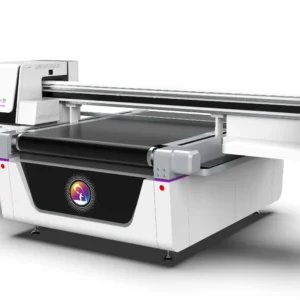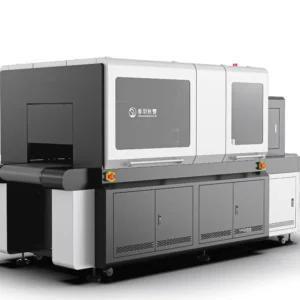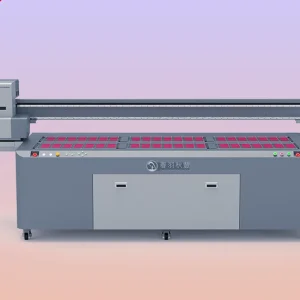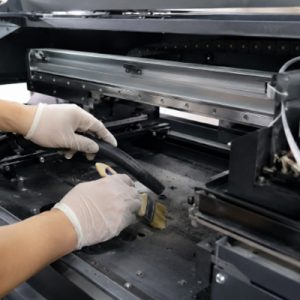
UV printers are widely used in advertising production, industrial product processing, packaging printing, and personalized customization fields. The equipment can perform high-quality printing on various material surfaces such as glass, acrylic, metal, plastic, and wood. However, during long-term operation, dust, material debris, and residues generated by ink evaporation can easily accumulate inside the machine. If these contaminants remain for a long time, they may not only affect the appearance of the equipment but also influence printing accuracy and operational stability.The interior of a UV printer contains multiple precision components, including printhead assemblies, guide rails, circuit areas, fans, and transmission structures. Dust generated during production may enter the machine through equipment movement and attach to mechanical structures or electronic components. When dust accumulates significantly, it may affect the smooth operation of guide rails, increase resistance during equipment movement, and even cause printing position deviation.
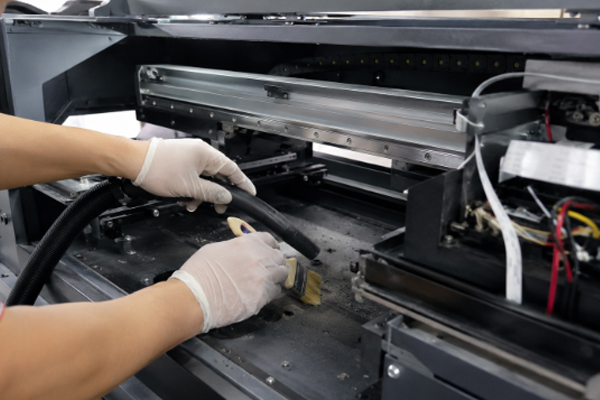
The dust problem around the printhead area requires special attention. If fine particles in the air enter the inkjet area, they may attach to the printhead surface and mix with UV ink to form stains, affecting normal nozzle operation. When some users find problems such as broken lines, uneven colors, or missing patterns during printing, in addition to checking ink and printhead conditions, they should also consider the impact of internal equipment dust. Regularly cleaning dust inside the UV printer can reduce equipment failure probability and help all components maintain good working conditions. However, proper methods must be followed during cleaning. The internal structure of UV printers is relatively precise, and incorrect operations may damage circuits, printheads, or mechanical components. Therefore, suitable tools should be used and cleaning should be performed according to the correct procedures.
Dust Cleaning Methods Inside a UV Printer
Clean Dust Around the Printing Area
The printing area is one of the places inside a UV printer that most easily accumulates dust. Since the printing platform frequently holds different materials, debris, powder, and material residues are easily generated during production. These contaminants may enter the printing area as the equipment operates and affect printing quality.Before cleaning the printing area, the power supply should be turned off to ensure that the equipment is completely stopped. Then, soft tools should be used to remove surface dust and prevent particles from entering the area near the printhead.
During cleaning, pay attention to:
- Use a lint-free cloth to wipe the printing platform and surrounding areas.
- Use a soft brush to clean debris from corners and edges.
- Check whether adsorption holes are blocked by dust.
- Avoid using hard objects to scratch the platform surface.
If cured UV ink residue exists on the printing platform, suitable cleaning products for the equipment should be used. Do not scrape it forcefully, as this may damage the platform surface and affect material fixation. Keeping the printing area clean can reduce the chance of dust entering the inkjet system and improve printing stability.
Clean Dust on Guide Rails and Moving Structures
During UV printer operation, the printhead moves along guide rails, making the guide rail area another location that easily collects dust. When dust attaches to the guide rail surface, it may affect equipment movement accuracy and prevent the printhead from moving smoothly.When cleaning guide rails, use a soft lint-free cloth to gently wipe away surface dust and contaminants. If excessive dirt exists on the guide rails, further treatment should be carried out according to equipment maintenance requirements.
When maintaining guide rails, pay attention to:
- Do not use fabrics that easily shed fibers.
- Check whether lubrication needs to be added after cleaning.
- Prevent dust from entering sliding components.
- Do not use large amounts of liquid to directly wipe mechanical parts.
Keeping the guide rails clean allows smoother printhead movement and reduces printing deviations caused by abnormal mechanical movement.
Clean Dust from Fans, Circuit Areas, and Internal Corners
UV printers are usually equipped with cooling fans and electronic control areas, which easily attract airborne dust. After long-term accumulation, dust may affect the heat dissipation performance of the equipment. When fans draw in air, they also bring dust from the surrounding environment into the machine. If dust covers heat dissipation areas, it may reduce airflow efficiency and increase equipment operating temperature.
When cleaning these areas, extra caution is required:
- Use a soft brush to remove surface dust.
- Use a small vacuum tool to remove loose particles.
- Avoid directly touching circuit components.
- Ensure the equipment is completely powered off before cleaning.
Circuit areas are sensitive parts. If users do not have relevant experience, they should not disassemble internal structures without permission. Simple cleaning of visible external dust is sufficient, while deep maintenance should be performed according to equipment requirements.
Perform Daily Dust Prevention to Reduce Internal Contamination
Dust cleaning is not only a task after problems occur; daily dust prevention management is also very important. There are many sources of dust in UV printer working environments, such as debris from material cutting, airborne particles, and production residues. If the equipment remains in a dusty environment for a long time, contaminants can quickly accumulate even with frequent cleaning. Therefore, reducing dust entry through proper usage habits is necessary.
Daily dust prevention measures include:
- Keep the area around the equipment clean.
- Clean dust from printing materials in time.
- Provide dust protection when the equipment is not in use.
- Regularly check the internal cleanliness of the equipment.
A good working environment can reduce cleaning pressure and help UV printers maintain stable operation.
The Impact of Internal Dust on UV Printer Performance
During equipment operation, dust may attach to mechanical components, inkjet areas, and heat dissipation locations, gradually reducing equipment performance. When dust enters the printing area, it may affect the working environment between the printhead and the material. Fine particles attached near the printhead can increase cleaning difficulty and even cause abnormal nozzle output.For products requiring fine pattern printing, such as electronic housings, decorative panels, and identification products, dust issues may affect the final printing results.
Dust inside mechanical structures can also affect equipment operation. If guide rails, sliders, and other components accumulate contaminants for a long time, movement resistance may increase, causing printhead positioning errors. When dust accumulates in heat dissipation areas, internal temperature management may also be affected.UV printers generate a certain amount of heat during long-term operation. If heat dissipation performance decreases, equipment stability may be affected. Therefore, regularly cleaning internal dust is an important task that should not be ignored in UV printer maintenance. Through simple inspections and timely cleaning, many potential problems can be reduced.
Frequently Asked Questions
How often should dust inside a UV printer be cleaned?
The cleaning cycle depends on the equipment operating environment. If the production environment contains a lot of dust, inspection frequency should be increased. Even in cleaner environments, internal conditions should still be checked regularly to prevent long-term dust accumulation.
Can compressed air be directly used to blow dust inside the printer?
It is not recommended to randomly use high-pressure airflow to clean the inside of the equipment. Strong airflow may push dust deeper into the machine and even affect electronic components and the printhead area. Soft brushes or vacuum tools are recommended for cleaning.
Does cleaning internal dust require disassembling the equipment?
Daily cleaning does not require frequent equipment disassembly. Visible external areas and locations that easily accumulate dust can be cleaned directly. If core internal components are involved, professional maintenance should be performed according to equipment structure.
Can dust cause UV printer printhead clogging?
It is possible. When dust enters the printing area, it may combine with ink residue and affect printhead operation. Therefore, keeping the equipment interior clean helps reduce printhead abnormalities.
Dust inside a UV printer needs to be handled promptly. Otherwise, long-term accumulation may affect printing quality, mechanical operation, and equipment stability. During cleaning, special attention should be paid to printing areas, guide rails, fans, circuit areas, and hidden dust accumulation locations.During daily use, suitable tools such as lint-free cloths, soft brushes, and professional vacuum equipment should be selected for cleaning. Incorrect cleaning methods should be avoided to prevent equipment damage. Precision components require careful handling, and users should not randomly disassemble or use excessive force simply to complete cleaning quickly.Proper internal dust management can reduce equipment failures and improve printing quality. Through regular inspections, timely cleaning, and maintaining a good operating environment, UV printers can maintain more stable working conditions and reduce future maintenance costs.