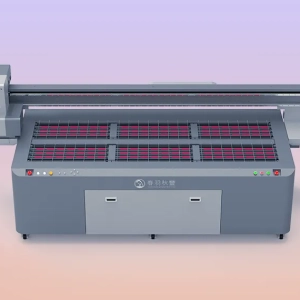
UV printers are widely used in advertising production, industrial processing, packaging printing, decorative product manufacturing, and other fields. The equipment can achieve high-quality printing on various material surfaces such as glass, acrylic, metal, wood, and plastic. As an important area for holding materials, the printing platform directly affects product positioning and printing results. During long-term use, the UV printer platform is prone to accumulating dust, debris, ink residue, and fine particles generated during material processing. Especially in some production environments, dust in the air, paper scraps, plastic particles, and other small contaminants can easily fall onto the platform surface and attach to the adsorption area through static electricity. If not cleaned in time, these dust particles may affect the fitting between the material and the platform, causing problems such as material movement and pattern deviation during printing.
UV printers usually rely on vacuum adsorption or platform flatness to fix printing materials. If there is a thick layer of dust on the platform surface, the material cannot fully fit the platform, causing changes in printing height. When the distance between the printhead and the material becomes unstable, ink droplets may not be accurately positioned, affecting pattern clarity and color uniformity. In addition, dust may also enter the internal parts of the equipment, affecting guide rails, transmission components, and areas near the printhead. Long-term accumulation of dust mixed with UV ink may form difficult-to-remove stains, increasing equipment maintenance difficulty. Therefore, regularly removing dust from the UV printer platform is an important step in maintaining printing quality and ensuring stable equipment operation.
Correct Methods for Handling Dust on a UV Printer Platform
Use Soft Tools to Remove Surface Dust
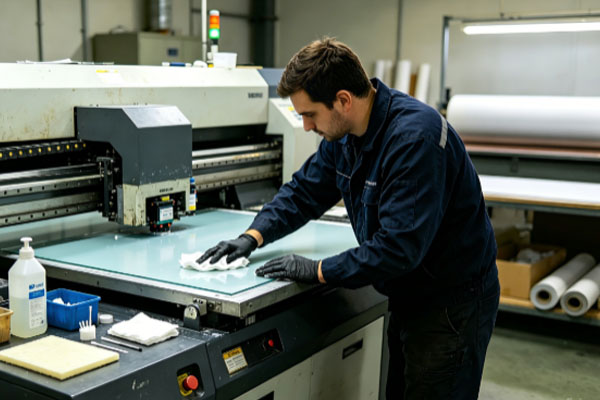
When cleaning dust from a UV printer platform, appropriate tools should be selected according to the degree of dust accumulation. For loose dust that has recently fallen onto the platform surface, soft tools can be used for simple cleaning. During cleaning, it is recommended to use lint-free cloths, soft brushes, or professional cleaning tools to gently wipe the platform surface. Avoid using rough materials or applying excessive force, because some UV printing platforms have specially treated surfaces, and excessive friction may affect platform flatness or the protective surface layer.
During cleaning, pay attention to:
- Turn off the printing equipment or pause printing tasks to avoid incorrect operations affecting equipment operation.
- Use clean and soft tools to prevent secondary contamination.
- Clean the platform edges and areas around adsorption holes to prevent dust accumulation.
- Do not directly use high-pressure air to blow toward the printing area to prevent dust from entering the equipment.
If the platform only has normal daily dust accumulation, simple wiping is usually enough to restore a clean surface.
Handle Stubborn Stains and Ink Residue on the Platform
In addition to dust, UV printer platforms may also contain fixed ink residue. These stains may not be completely removed by simple wiping and require more careful treatment. When UV ink drops onto the platform, it may gradually cure under ultraviolet exposure or air contact, forming harder deposits. If these stains are located in the material placement area, they can affect the flat contact between the printing material and the platform. When cleaning cured ink, a cleaning agent suitable for UV equipment can be used to soften the residue, followed by careful removal with soft tools.During cleaning, sharp metal tools should not be used directly for scraping, as they may scratch the platform surface. For dust mixed with stains on the platform, surface particles should be removed first, followed by localized cleaning. This can prevent dust particles from causing scratches during wiping.
Clean Vacuum Adsorption Holes and Platform Gaps
Many UV printers use vacuum adsorption platforms to fix printing materials through suction. If the adsorption holes on the platform become blocked by dust, the adsorption performance will decrease. During long-term production, dust, material fragments, and processing residues can easily enter the adsorption holes, causing reduced suction in certain areas. When printing materials are not firmly fixed, printing position deviation may occur.When cleaning the adsorption area, small cleaning tools can be used to remove debris around the holes. For dust located in deeper areas, cleaning should be performed according to the equipment structure to avoid damaging the adsorption system.
During maintenance, pay attention to:
- Regularly check whether adsorption holes are blocked.
- Clean areas around the platform edges where dust easily accumulates.
- Avoid allowing debris to remain in the adsorption area for a long time.
- Increase cleaning frequency according to the equipment operating environment.
Keeping the adsorption platform unobstructed can improve material fixing performance and make the printing process more stable.
Perform Daily Dust Prevention
In addition to removing existing dust, reducing dust entering the equipment is also an important maintenance method. If the working environment of a UV printer contains a large amount of dust, it will increase platform cleaning frequency and may also affect internal equipment components. The equipment operating area should be kept clean as much as possible, and the printer should be kept away from major dust sources. For example, environments such as wood processing areas and cutting workshops generate many fine particles, requiring stronger cleaning management.
Daily dust prevention measures include:
- Regularly clean the environment around the printer.
- Provide dust protection when the equipment is not in use.
- Reduce material processing debris entering the printing area.
- Clean dust from the surface of materials before printing.
A good working environment can reduce platform contamination and lower equipment maintenance pressure.
The Impact of Platform Dust on UV Printing Quality
The cleanliness of a UV printer platform directly affects the stability of the printing process. Many printing problems are not entirely caused by ink or printing parameters; accumulated platform dust can also lead to quality degradation. When dust exists between the printing material and the platform, it changes the actual height of the material, causing changes in the distance between the printhead and the material. When the distance is unstable, ink droplets cannot accurately reach the target position, resulting in problems such as blurred edges and unclear details.
For precision product printing, such as phone cases, nameplates, and electronic product housings, even tiny particles on the platform may affect the final results. Especially when multi-layer printing or embossing effects are required, platform flatness becomes even more important.Dust may also affect material fixation. If the material does not fully fit the platform, slight movement may occur during printing due to printhead movement or equipment vibration, causing pattern misalignment.
Frequently Asked Questions
How often should dust on a UV printer platform be cleaned?
The cleaning frequency depends on the production environment. If the equipment is used frequently every day, it is recommended to check the platform condition before daily operation. If the environment contains a lot of dust, cleaning frequency should be increased to prevent dust from affecting printing quality.
Can water be directly used to wipe a UV printer platform?
It is not recommended to use a large amount of water for cleaning. Moisture may enter equipment gaps or adsorption holes and affect equipment operation. Appropriate tools and cleaning methods suitable for the equipment should be used.
Will platform dust affect the printhead?
It can have some impact. If dust is lifted by airflow or equipment movement, it may enter the printing area and attach near the printhead, affecting ink spraying stability. Therefore, the platform and internal equipment environment should be kept clean.
Should the equipment be turned off when cleaning the platform?
It is recommended to pause equipment operation before cleaning. This can prevent accidental contact with the control system and ensure safer cleaning.
Dust on a UV printer platform needs to be handled promptly; otherwise, it can affect material fixation, printing accuracy, and equipment operating conditions. Proper platform cleaning not only requires removing surface dust but also requires attention to adsorption holes, edge areas, and possible ink residue.During daily maintenance, cleaning habits should be developed according to the equipment operating environment. Production environments with frequent operation or high dust levels require more frequent inspections. Even in cleaner environments, basic cleaning work should not be ignored.
When handling dust, appropriate tools should be selected to avoid damaging the platform with hard objects. For stubborn stains, professional cleaning methods should be used to prevent incorrect operations from affecting equipment performance. Keeping the UV printer platform clean is an important measure to ensure stable printing quality.Through regular cleaning, dust prevention management, and standardized operation, abnormal situations during printing can be reduced, allowing the equipment to maintain good working performance.